Interact with this post using Mastodon or
Barebones e-reader: Xteink X4
Published on
Minimalism is knocking on my door once more. Due to recent “geopolitical” circumstances, my relatives can no longer send me physical books. So, the obvious solution to keep reading was to turn to e-books. However, two issues arise: e-readers are overpriced, and reading on a screen didn’t work for me the last time I tried it about 15 years ago.
But you’re sharp enough to have guessed, from the title of this blog, that the Xteink X4 device has changed all of that for me.
Minimalist design and barebones features
The Xteink X4 is an extremely minimalist mini e-reader both in terms of features and size. Here are the specs:
| Display | 4.3 inch |
| Resolution | 220 PPI |
| Dimensions | 114 × 69 × 5.9 mm (4.49" × 2.72" × 0.23") |
| Weight | 74g |
| CPU | ESP32-C3 |
| Storage | Comes with 16 GB microSD card, supports expansion up to 512 GB |
| Connectivity | Wi-Fi 2.4 GHz ; Bluetooth |
| Port | 1 USB-C |
| Physical Buttons | Power Button, Page-Turn/Action Buttons (2 on the side ; 2 at the bottom) |
| Battery | 650 mAh (lasts up to 14 days, based on 1–3 hours of reading per day) |
| Supported Formats | Document: EPUB, TXT / Image: JPG, BMP / Fonts: BIN |
| Front light | No |
| Touchscreen | No |
| Reset Button | Yes |
| Price | $69 |
Few notes:
- the X4 is now available on Amazon
- there’s an X3 model, which is even more compact. However, this might push the limits of portability too far, making the readability of books quite challenging and tiring.
- the X4 successor - the S4 model - has been announced for the end of 2026. It should have the same physical size but comes with a touchscreen and runs under Android.
This device is designed with portability in mind, offering a sleek and compact form that’s perfect for on-the-go reading. While it’s not intended to replace your primary e-reader, it’s the only one for me and serves me well even during 1-hour reading sessions without creating eye fatigue thanks to its crisp e-ink display and crisp text.
A canvas for tinkerers, but accessible
The big issue with the X4 is its default firmware which is slow and only offers very limited settings. Tech enthusiasts who read this blog will consider that to be a plus though because they’ll remember that this device is just an ESP32-C3, meaning that you can easily hack it.
The community has developed several alternative firmwares for the X4. Before we dive into some of these options, it’s worth highlighting that the flashing process has been streamlined to an incredibly user-friendly experience. In fact, it’s so simple that anyone can do it with just two clicks, thanks to an intuitive online interface. And don’t worry, you can as easily downgrade back to the official firmware if you want. On top of that you can virtually never ever brick the X4. But in case you find a way to do it, there’s a solution .
Below are some firmware to chose from. Check their Github page for all the details, but globally the intend is to offer better performance and more options for adjusting the display settings.
- Crosspoint : the most known community-built firmware.
- Papyrix : It’s a fork of Crosspoint, a bit more lightweight and in some areas, more user friendly.
- SUMI : Currently in Beta version, it has weather, games, and much more.
- Crosspet : A Vietnamese fork of CrossPoint. It brings a virtual pet, mini games, weather, lunar calendar, and a pomodoro timer.
Here are some examples of the various layouts you can create with Crosspoint and Papyrix using their respective default font:

Papyrix ultra compact
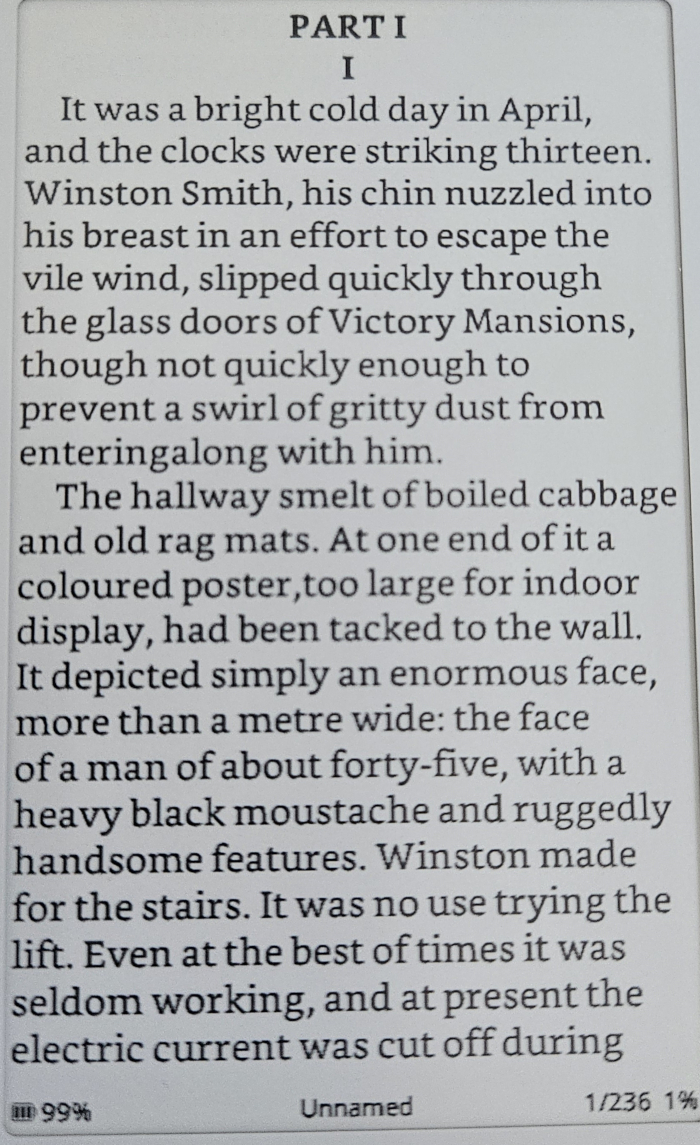
Papyrix small font size

Crosspoint small font size
Upload and sync your books
The X4 includes a microSD card for storing your books. Personally, I just transfer files directly to the card from my computer, but there are also wireless options available for uploading and managing your library.
You can do so using Calibre, KOReader Sync, or using your device as a hotspot.
Optimize your files
No matter which firmware you choose, I highly recommend optimizing your EPUB files. Doing so will significantly improve your reading experience by reducing load times. For example, indexing a new chapter could drop from 5 seconds to just 2 seconds, making the whole process much smoother.
The developer of the Papyrix firmware, has developed a nice little tool
to perform the magic.
Here is the quick tuto:
- clone the repo:
git clone https://github.com/bigbag/epub-to-xtc-converter.git - cd to the
epub-to-xtc-converter/clifolder - run
node index.js optimize [epub_file|epub_dir] -o [optimized_epub_file|optimized-epub_dir] -c settings.json
Flash the firmware online
The dev of the Crosspoint firmware has also built an online tool to flash any firmware.
On this page, there are two main sections:
- the “Full flash controls” let you backup the current firmware (“save full flash”) and upload an alternative firmware including the bootloader and partition table (“write full flash from file”).
Most people will want to upload the firmware only though using “OTA fast flash controls” > “Flash firmware from file”. The firmware .bin file can be found on each firmware Github page. - At the top of the page, you’ll notice a “debug” section . You can use it to “swap boot partitions”. What does that mean? When you upload a firmware using the “OTA fast flash controls” options, it’ll be installed aside from your current firmware. This allow you to have two firmwares installed, so you can switch from one to the other in case you want to test two or just have one has a quick backup.
Flash the firmware locally
The partitions
It’s important to understant how the Xteink X4 16MB flash memory is organized.
| Offset (size) | Role | |
|---|---|---|
| Bootloader | 0x0000 (~12KB) | ESP32-C3 second-stage bootloader |
| Partitions | 0x8000 (3KB) | Partition table |
| OTA data | 0xE000 (8KB) | OTA boot state tracking |
| App (OTA 0) | 0x10000 (~6.3MB) | Main application |
| App (OTA 1) | 0x650000 (~6.3MB) | OTA update partition |
| SPIFFS | 0xC90000 (~3.3MB) | File storage |
Esptool commands
Esptool allows to flash the firmware (downloaded from the project’s Github page).
To have your device recognized on Linux, you may have to add yourself to the dialout or uucp (in Archlinux) group using sudo usermod -aG [dialout|uucp] ${USER}
Thanks to the dual OTA partitions, you can install two different firmwares on the device, giving you the flexibility to switch between them whenever you like (though you still need to use a computer to do so).
- Flash a firmware, including the bootloader and partition table:
esptool --chip esp32c3 --port /dev/ttyACM0 --baud 460800 write_flash -z 0x0 firmware.bin - Flash a firmware on OTA 0:
esptool --chip esp32c3 --port /dev/ttyACM0 --baud 460800 write_flash 0x10000 firmware.bin - Flash a firmware on OTA 1:
esptool --chip esp32c3 --port /dev/ttyACM0 --baud 460800 write_flash 0x650000 firmware.bin
If you have flashed your firmware to another partition, you’ll first need to switch boot partition with python otatool.py --port /dev/ttyACM0 switch_ota_partition --slot [1|2].
Then, boot your new firmware by pressing the reset button once and then turning on your X4.
Reset the firmware
If your device is not responsive, don’t panic. Here are different steps to get you back on track:
- enter boot mode: press the reset button, followed quickly by the power button for 3 seconds
- enter download mode: while holding the power button, press the small reset button once, then let go of the power button
If nothing works, your last chance is to reset the firmware with esptool --chip esp32-c3 erase_flash
Then flash the backup firmware you’ve created as mentioned earlier
. In case you skipped this step, use the stock firmware
.
Conclusion
The Xteink X4 carves out a unique space in the e-reader market. It’s not trying to be a tablet, nor is it shackled by proprietary ecosystems. Instead, it offers a refreshing blend of minimalist hardware and open-source software potential, making it an excellent fit for user who values control, efficiency, and a truly distraction-free reading experience. Give it a shot, you might find it’s the perfect little companion.
More food for thoughts? Check other posts about: #System
Thanks for your read. Hope it's been useful to you.
✄ ┈ ┈ ┈ ┈ ┈ ┈ ┈ ┈ ┈ ┈ ┈ ┈ ┈ ┈ ┈ ┈ ┈ ┈ ┈ ┈ ┈ ┈ ┈ ┈ ┈ ┈ ┈